
Oscar Health
Oscar Health, IncMedical
3.11.23K Reviews
- Version
- 6.43.1
- Installs
- 500.00K
- Age Rating
- Everyone
Screenshots

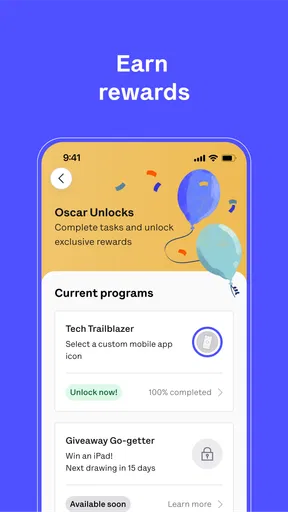
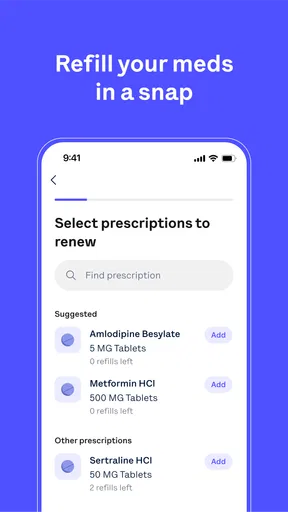
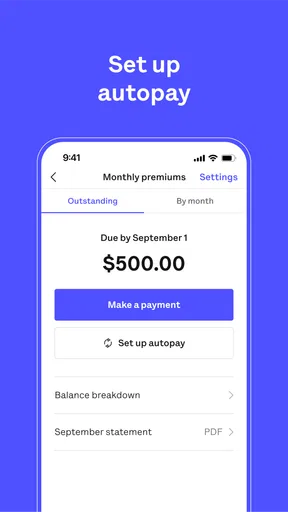
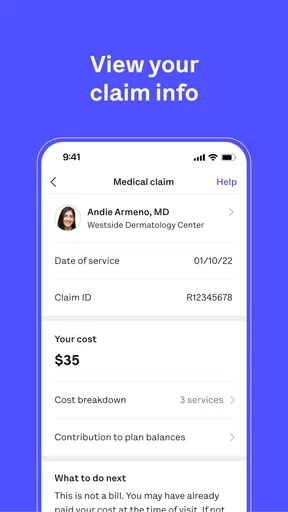
Our Review of Oscar Health
 Analysis by Appyee
Managing health insurance from a phone sounds simple until you need to find care quickly, check a claim, or understand what your plan covers while you are away from home. Oscar Health is built for that kind of on-the-go task. I reviewed it as a medical app from Oscar Health, Inc., and my impression is that it works best as a practical companion for existing Oscar members rather than as a general health tool for everyone.
The app is free and available to users of all ages under its Everyone content rating, although the services and information inside it are naturally most useful to people connected to an Oscar health plan. It has been available since December 19, 2014, and its current version is 6.41.0. That long presence gives it the feel of an established insurance app, but the experience still depends heavily on what you need to do and how comfortable you are handling personal medical information digitally.
How Oscar Health feels during everyday use
My first expectation with an insurance app is not entertainment or visual polish; it is speed. When I am sick, standing in a pharmacy, or trying to arrange care between other commitments, I want the important option to be easy to reach. Oscar Health is aimed at reducing that friction by bringing member-related care tasks into one mobile place. The benefit is less about spending time inside the app and more about avoiding unnecessary calls, searches, and paperwork.
The app makes the most sense when I already know what I am trying to accomplish. Checking a plan detail, looking for a care option, or handling a routine member task feels more manageable when I approach it with a specific question. It is less convincing as an app I would open casually to browse health information, because its value is tied to Oscar membership rather than broad medical education.
That distinction matters when comparing it with the usual alternatives. A general symptom checker may be better for exploring possible causes of a minor issue, while a hospital or clinic app may be stronger for appointments with one particular provider. Oscar Health occupies a different space: it is the insurance-side tool that helps connect a member with care and plan-related information. I would not replace a provider’s app with it, and I would not expect it to replace urgent medical advice.
In terms of perceived responsiveness, I found the experience most useful when moving through a short, familiar workflow. The fewer decisions I had to make, the more immediate it felt. Insurance terminology can still slow a task down even when the app itself responds well, so a user should separate two kinds of friction: waiting for a screen and understanding what the screen means. The second problem is often the bigger one.
What happens when the app is under pressure
Heavy use usually happens at inconvenient times. I might be trying to locate care while traveling, checking something after receiving a medical bill, or looking at coverage details before agreeing to a service. These moments are more demanding than opening the app for a quick glance because they involve several steps, personal decisions, and sometimes a need to compare information with another source.
One useful habit is to open the app before an appointment day and become familiar with the route to the information I expect to need. That is a small but important advantage over waiting until I am in a waiting room with limited time. It also helps reveal whether I am looking for an insurance answer or a provider-specific answer. If the question concerns a doctor’s schedule, medical records, or instructions from a clinic, the provider’s own system may still be the better destination.
A second practical workflow is to treat the app as a starting point rather than the only source of truth during a complicated care decision. I would use it to review the member-side information available to me, then confirm details with the relevant provider when the decision involves a procedure, a referral, or a potentially expensive service. That is not a criticism unique to Oscar Health; insurance information can be difficult to interpret in any digital format. The app can organize the process, but it cannot remove every coverage question.
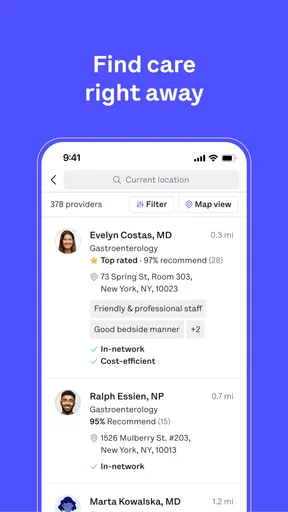
For a realistic everyday example, imagine that I develop a persistent cough while away from my usual neighborhood. I could use Oscar Health to begin the search for an appropriate care route instead of opening a random search engine and choosing the first result. Once I identify the next step, I would still check the clinic’s own details, availability, and medical guidance. The app is valuable here because it helps me start from my insurance relationship, not because it independently diagnoses or treats the problem.
Another heavy-use moment comes after care, when I want to understand what happened financially. This is where patience helps. A health plan app can show useful information, but medical billing often involves several parties and unfamiliar terms. I would avoid making a quick assumption based on one line or one screen. If something looks unclear, I would keep the relevant details together and contact the appropriate support channel rather than treating the app as a final explanation of every charge.
Stability and trust when health information matters
Reliability is especially important in a medical app because the cost of a mistake is not just inconvenience. I want the app to open consistently, preserve a clear path through member tasks, and present information in a way that does not encourage guesswork. Oscar Health’s established history and continued version updates make it feel like a maintained product rather than a temporary companion, but that does not mean every individual task will be equally smooth.
The average rating is 3.2 from around 3,700 ratings, with roughly 1,200 written reviews. I read that as a sign to keep expectations realistic. The app clearly serves a substantial audience, yet user satisfaction is mixed enough that I would not recommend relying on it without a backup plan for time-sensitive situations. A phone number, provider contact, or saved plan document can be useful when access to the app is inconvenient.
That backup mindset is sensible for any insurance application. A login problem, an interrupted connection, or a confusing result can happen at exactly the wrong time. I would not wait until an emergency to discover whether I remember my credentials or know where my member information is located. Preparing those basics in advance improves the experience more than repeatedly reinstalling an app after a problem appears.
I also prefer to review sensitive information carefully before acting on it. A medical app is not the place for hurried taps, especially when the next step could involve an appointment, a payment question, or a choice of care. Oscar Health can make the administrative side more accessible, but the responsibility to verify important details remains with me and, when needed, with Oscar or the healthcare provider.
Recovery after an interruption is another part of reliability. If I leave a task halfway through, I want to be able to return without having to reconstruct everything from memory. In practice, I would make a note of what I was trying to do and keep any relevant confirmation or reference details. That simple approach reduces the risk of repeating a request or assuming that an unfinished action was completed.
Device limits, operating system needs, and resource expectations
The listed minimum operating system is version 11. That is an important practical filter before downloading. Users with an older phone may not be able to install or update the app, so checking the device software first can prevent wasted time. For people using a supported device, the app is not presented as a game or media-heavy product, and I would expect its main demands to come from loading account and care information rather than constant background activity.
Still, a medical app can feel demanding on an older device even when it is not graphically complex. Limited storage, an aging operating system, or a crowded phone can make any account-based application slower to open and harder to use. I would keep the phone updated where possible, leave enough free storage for normal app maintenance, and avoid testing an important workflow for the first time during a medical appointment.
Connection quality may matter more than raw device power. When I am at home on a stable network, the process should be easier to judge. In a basement, a crowded clinic, or while traveling, delays may come from connectivity rather than from Oscar Health itself. If I need information in a place where service may be unreliable, I would prepare earlier and keep essential member details accessible through the normal documents or contacts I already use.
Privacy also shapes device choice. Because this is a medical application, I would use a personal phone protected by a screen lock rather than a shared family device. I would be cautious about leaving the app open in public and would review any displayed information before handing the phone to someone else. These are ordinary habits, but they matter more here than they would in a casual shopping or entertainment app.
The app’s free price removes a direct purchase barrier, which is helpful for members deciding whether to install it. However, free does not mean that every healthcare service connected to an insurance plan is free. I would never interpret the download cost as a promise about copays, deductibles, prescriptions, or provider charges. The app is free to obtain; the financial side of care still depends on the plan and the service involved.
Who benefits most from Oscar Health
I would recommend Oscar Health first to current Oscar members who prefer handling routine insurance tasks from a phone. It is particularly suitable for people who travel between appointments, want a central place to begin care-related searches, or dislike making a call for every basic question. It can also help users who are comfortable checking details themselves before contacting support.
It may be useful for a family member helping another adult organize care, but I would be careful with shared access and personal information. The person using the phone should understand whose account is open and which details are being viewed. A convenient app does not remove the need to respect the member’s privacy or confirm that the account information belongs to the right person.
I would skip it if I am not an Oscar member and am looking for a general-purpose medical reference app. In that situation, the insurance connection is not an advantage. I would also look elsewhere if my main need is detailed clinical communication with one hospital, access to lab results from a specific provider, or a full medical-record portal. Those functions are usually handled more directly by the healthcare organization that created the record.
People who strongly prefer speaking with an insurance representative may not gain much from the app either. Digital self-service is convenient when the question is straightforward, but a complicated coverage dispute or unusual billing situation can be better handled through a human conversation. I see Oscar Health as a way to shorten routine administration, not as a replacement for every support channel.
Compared with a web browser, the app’s main advantage is convenience: I can begin from a dedicated member experience instead of searching for the correct Oscar page each time. Compared with a provider app, its advantage is the insurance perspective. Compared with a general medical app, its advantage is relevance for Oscar members and its weakness is the narrower audience. Choosing between them depends on where the information I need actually lives.
Small habits that make the experience better
My first tip is to explore the app while healthy. Find the areas you expect to use, check that the account opens correctly, and learn the language used for care and plan information. Doing this in advance turns a stressful search into a familiar routine. It also gives me time to discover whether a question belongs in Oscar Health or in a provider’s separate system.
My second tip is to use exact questions when reviewing coverage-related information. Instead of asking myself whether something is simply “covered,” I would identify the service, the provider, the location, and the timing. Coverage can depend on those details, so a broad assumption may be misleading. If the app gives me a useful starting point but not a complete answer, I would contact Oscar or the provider before committing to care.
My third tip is to keep a simple record of unresolved tasks. I might note the date I checked something, the name of the provider, and what still needs confirmation. This is especially helpful when a medical bill or appointment involves more than one organization. It prevents the common mistake of assuming that finding a provider or viewing plan information means every administrative step is finished.
A final tip is to avoid judging performance from one bad moment alone. If a page takes longer than expected, I would check the connection, close unrelated apps, and try again later before deciding that the entire experience is unreliable. At the same time, I would not repeatedly retry a sensitive transaction without checking whether the first attempt went through. That balance protects both time and accuracy.
My performance verdict
Oscar Health succeeds when I use it for what it is: a mobile insurance companion for Oscar members who want to begin care and plan-related tasks without reaching for a desktop browser. Its free access, established presence, and focus on member needs make it a sensible download for the right audience. The current version is 6.41.0, and the app has passed the point where I would view it as an experimental service.
My reservations are practical rather than dramatic. The mixed average rating suggests that the experience is not universally smooth, and insurance workflows can remain confusing even when the app loads quickly. It also should not be treated as a diagnostic tool, a substitute for urgent medical care, or a complete replacement for a clinic’s own application. Users with older devices must meet the minimum operating system requirement, and everyone should keep an alternative contact route available for important issues.
Overall, I would recommend Oscar Health to an Oscar member who values self-service and wants a convenient place to start handling care on the go. I would recommend a provider-specific app for clinical records and appointment details, and a direct conversation for complicated coverage or billing questions. The best way to use Oscar Health is as the organized first step in a larger healthcare workflow, not as the only step.
For me, that makes it a useful but purpose-built medical app. It can reduce everyday administrative friction, especially when I prepare before needing it, but its real value depends on membership, a supported phone, and realistic expectations about what an insurance app can explain. If those conditions fit your situation, Oscar Health is worth trying; if they do not, another healthcare tool will probably serve you better.
The app is available at no charge, and its broad installation base of over 500,000 installs shows that many people use it as part of their Oscar experience. I would still choose it for relevance rather than popularity. When the task is connected to an Oscar plan, that relevance is its strongest reason to keep it on my phone.
Privacy and Permissions
See what permissions an app requests and how it handles your data.
- Identity
- find accounts on the device
- Contacts
- find accounts on the device
- Location
- approximate location (network-based)
- Phone
- read phone status and identity
- Photos/Media/Files
- read the contents of your USB storage, modify or delete the contents of your USB storage
- Storage
- read the contents of your USB storage, modify or delete the contents of your USB storage
- Camera
- take pictures and videos
- Microphone
- record audio
- Wi-Fi connection information
- view Wi-Fi connections
- Device ID & call information
- read phone status and identity
- Other
- view network connections, pair with Bluetooth devices, full network access, change your audio settings, run at startup, control vibration, prevent device from sleeping
Verdict
Strengths of Oscar Health
- Simple digital tools for managing plans, claims, and member information.
- Virtual care options can reduce the need for in-person appointments.
- Personalized health guidance may help users understand available care choices.
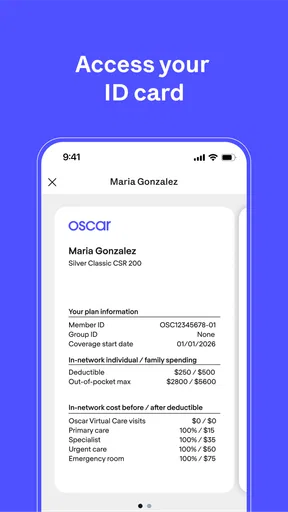
- Useful access to plan details, ID cards, and coverage information on the go.
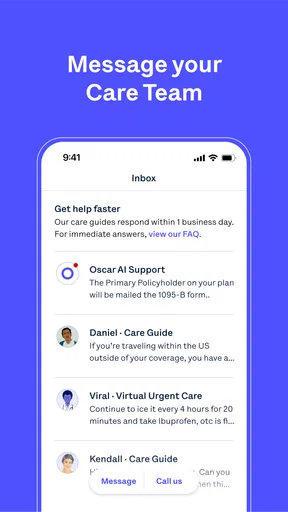
- Can make communication with Oscar support more convenient for members.
Limitations of Oscar Health
- Features and availability depend heavily on the user’s Oscar plan and location.
- Some services may redirect users to external providers or separate platforms.
- Claim and coverage information may take time to update after recent activity.
- The app is mainly useful to Oscar members, limiting its value for others.
- Health recommendations and virtual care do not replace emergency medical services.
Similar Picks in This Category
View All
WebMD: Symptom Checker
WebMD, LLC4.1

Microphone Amplifier
DOSA Apps4.2

Anatomy Learning - 3D Anatomy
3D Medical OU4.5

Period Tracker and Calendar
SimpleInnovation4.9

GoodRx: Prescription Coupons
GoodRx4.8

CVS Health
CVS Pharmacy4.5
Frequently Asked Questions
What is Oscar Health, and what can I use the app for?
Oscar Health is a health insurance app designed for members of Oscar health plans in the United States. After signing in, you can review plan information, check benefits, view claims, search for doctors and facilities, access digital ID card details, and manage certain care or billing tasks. Available features may vary depending on your plan, location, and membership status.
Can I use Oscar Health without having an Oscar insurance plan?
The app is primarily intended for people enrolled in an Oscar Health insurance plan, so most useful features require an active member account. You may be able to download the application and explore limited information, but viewing claims, benefits, digital identification, provider details, and personalized costs generally requires signing in with eligible member credentials. Availability also depends on your state and plan.
Does Oscar Health help me find doctors and understand my coverage?
Yes, the app can help members search for in-network doctors, specialists, hospitals, and other healthcare providers, although search results should always be verified before making an appointment. It also presents plan benefits, deductibles, copayments, coinsurance, and claim information in one place. Exact costs can depend on the provider, service, location, and current plan rules.
Can I use Oscar Health for virtual care or communicate with healthcare professionals?
Depending on your Oscar plan and location, the app may provide access to virtual care options, care guidance, or communication tools connected with your healthcare services. These features are not necessarily identical for every member, and some appointments or services may involve separate providers, eligibility requirements, or additional charges. Check the app and your plan documents before relying on virtual care.
Is the Oscar Health app secure, and what should I do if I cannot log in?
Oscar Health handles personal health and insurance information, so the app requires account authentication and should be used on a secure device and network. If you have trouble logging in, confirm your email or member details, update the app, and use the password-recovery option. For unresolved access problems, contact Oscar member support through the official website or the contact options shown in the app.
